Is Managing Time Really the Key to Managing Life?
There’s a famous saying that if you can manage your time, it isn’t much more complex to manage your life, and a well-built task schedule template is exactly the tool that makes that saying practical rather than just inspirational. Time management is the basic element that allows a person to perform various tasks on time, whether personal or professional, and losing track of a complex job with numerous moving pieces is remarkably easy without a plan. Scheduling every task is the best solution for that problem, and a task schedule template is a handy document that permits a person to note down all their tasks with allocated time in one single place.
What Happens When Priorities Are Written Down Instead of Remembered?
Anyone wanting to increase productivity while working in the office or at home benefits from a free task schedule template, which makes it possible to prioritize important tasks against the available timeframe so the most important things get done first. Once a complete list of tasks for the day is in front of you, planning time for each one becomes far easier using ordinary creative time-management skills. Writing things down in a list is always useful for getting things done faster, and a task schedule template turns that list into a productive daily schedule rather than a scattered set of sticky notes.
Can One Document Really Keep an Entire Team on Track?
A task schedule template helps a person stay on track while completing business or personal tasks toward a positive outcome, identifying exactly what must be done and at what time. Business organizations and project managers commonly use a task schedule to distribute different parts of a larger task between employees, ensuring it gets accomplished on time without unnecessary delay. A task schedule can certainly be prepared directly in Microsoft Excel, but a ready-made task schedule template makes the whole process far more organized for anyone building one for business or personal use.
Task Schedule Template Is Added Here

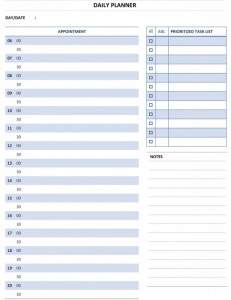

-


-
Title: Task schedule template Doc (2254 clicks)
Caption: Task schedule template
Filename: task-schedule-template-doc.zip
Size: 39 KB

Frequently Asked Questions About the Task Schedule Template
What should a task schedule template include?
At minimum, each task’s description, allocated time, and priority level. Many users also add a status column to track what’s completed versus still outstanding.
Who typically uses a task schedule template?
Business owners, project managers, employees, and individuals managing personal responsibilities all rely on it, since it communicates exactly what needs doing and when.
Can this template handle both personal and professional tasks?
Yes, the same underlying structure of task, priority, and time works equally well for organizing a personal to-do list and managing professional deliverables.
What file format does the task schedule template come in?
It downloads as an editable file that opens in Microsoft Excel, so tasks can be typed directly in and the document can also be printed for a desk or planner.
How often should a task schedule be updated?
Update it daily or whenever priorities shift. A task schedule template is only useful when it reflects the current, accurate list of what still needs to be done.
Can this template help reduce missed deadlines?
Yes, having every task and its allocated time visible in one place makes it far easier to notice something urgent before it’s too late to address properly.
Is the task schedule template suitable for distributing work across a team?
Absolutely — many project managers use it to assign specific parts of a larger task to different employees, keeping the whole team accountable to the same timeline.
Can the task schedule template be shared with colleagues or family?
Yes, sharing a current version keeps everyone working from the same information about what’s planned, reducing the confusion that comes from relying on verbal updates alone.
What happens if a task’s priority changes during the day?
Because the file is fully editable, reordering or updating a task takes only a moment, and the rest of the task schedule template stays intact without needing to be rebuilt.
Does the task schedule template help with prioritization?
Yes, seeing every task laid out with its priority level makes it much easier to decide what to tackle first rather than working on whatever comes to mind.
Can this template be reused for future days or weeks?
Yes, since it is fully editable, many users keep a blank master copy and simply duplicate it for each new day, saving the effort of designing a new layout every time.
Is the task schedule template useful for tracking recurring tasks?
Many users add a notation for tasks that repeat daily or weekly, keeping recurring responsibilities visible alongside one-time tasks in the same document.
Who should be responsible for maintaining the task schedule?
Whoever owns the tasks typically updates it, whether that’s an individual managing personal responsibilities or a manager coordinating work across a team.
Can the task schedule template be printed for a desk or planner?
Yes, many people print a current copy and keep it at their workspace, giving them a quick visual reference without needing to open a digital file throughout the day.
Does this template help reduce the stress of a packed to-do list?
Yes, seeing every task mapped out against available time removes much of the uncertainty that fuels stress, since a person always knows what’s realistic rather than guessing.
Can the task schedule template track long-term goals alongside daily tasks?
Yes, many users break a larger goal into smaller daily tasks within the same template, making a big project feel manageable rather than overwhelming.
Is a digital or printed task schedule better for staying productive?
Many people keep both — a digital version that’s easy to update as priorities shift, and a printed copy for a distraction-free glance during focused work.
Can the task schedule template help with time-blocking?
Yes, many users assign a specific block of time to each task rather than just a due date, which turns the schedule into a proactive plan rather than a reactive list.